Follow this procedure to update a Cassini tester configuration from the 20 GHz config to a 50 GHz config. The steps below reference standard procedures for adding an additional TIM and (optionally) updating a Cal List. These steps assume the current Cassini configuration has quantity 3 RI7715 20 GHz Source TIMs (Source1, Source2, RecLO) and a RI8587 Receiver TIM.
Requirement Equipment:
- RI8607 50 GHz TestSet (T-4 Testhead50)
- Qty 2 RI8586 25 GHz Sources (T-15 Source1, T-16 Source2)
- (Optional) Qty 1 RI8586 25 GHz Sources (T-1 Source3)
- RI8596 Receiver with LO (T-3 Receiver)
- Existing Cassini Configuration with QTY 3 RI7725 20 GHz Sources (T-15 Source1 + RecLo, T-16 Source2) and RI8587 20 GHz Receiver w/out LO
- Diag/Cal Interface plate for this updated Configuration
- (Optional) Desktop workspace for Monitor/Keyboard/Mouse.
- Software .GZP with RiInstrumentCal, RIInstrumentDef, RiCalList.
- Name of new Cal List to support this Configuration (customer specific)
To Install 50 GHz TestSet, 25 GHz Sources and Receiver:
 Import Cal Data .GZP via Guru Browser: The TIM will be supplied with one or more Guru zip files (.GZP) usually sent via email. These should contain the following: TIM Definitions, Calibration Data, Short Cut, Patches, and and updated Cal/Diag List. Because some Instruments may require updated Patches and an updated Short Cut, be bure to always use the latest "Dev" Short Cut when installing new TIMs.
- Log On to Guru with a user with Developer role.
- Choose Short Cuts and select the latest "Dev ##.##" version available.
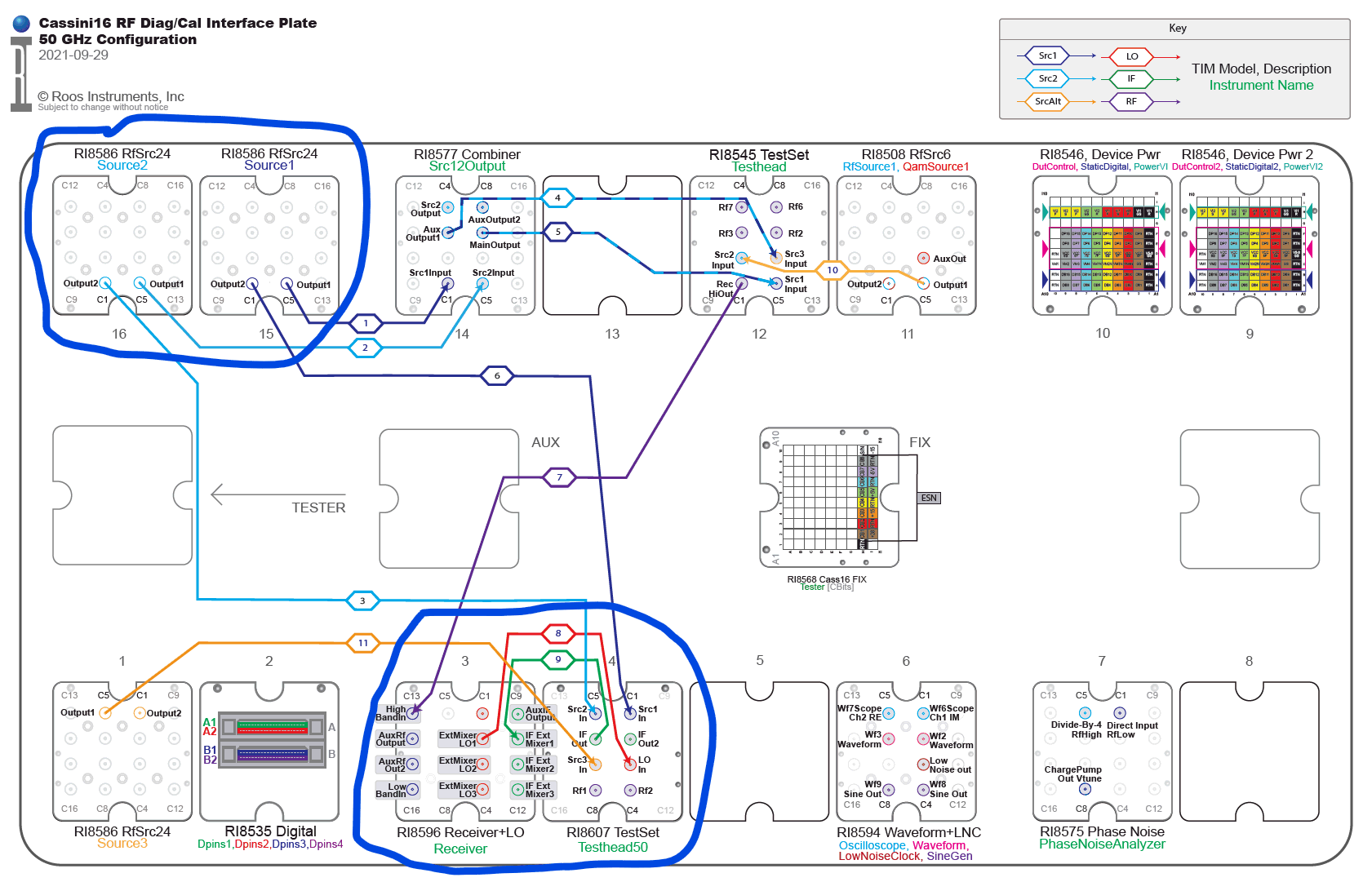
- Reference the "before" and "after" Diag/Cal Interface Plate and RF System Block diagrams provided by RI Support for the T-Location required for the Configuration. (See Figure 1 and Figure 2)
- Remove the TIMs in T-1,T-3, T-15, and T-16.
- Choose System > Check from the Cassini application to remove the Instruments from the Configuration.
- For the RI8607 50 GHz TestSet TIM, insert into T-4 and choose System > Check so it is added as the Source1 instrument
- For the 1st RI58586 25 GHz Source TIM, insert into T-15 and choose System > Check so it is added as the Source1 instrument.
Note: Do Not add all sources at the same time. This allows the tester to assign the instrument names in a specific order. - For the 2nd RI58586 25 GHz Source TIM, insert into T-16 and choose System > Check so it is added as Source2 instrument.
- (Optional) For the 3rd RI58586 25 GHz Source TIM, insert into T-1 and choose System > Check so it is added as Source3 instrument.
- For the RI8596 Receiver with LO TIM, insert into T-3 and choose System > Check so it is added as Receiver instrument.\
- From the Configuration window, choose the System instrument, then choose Instrument > Calibration > Calibrate. Find the desired Cal List list in the list, left click on it to highlight and choose Select. This will activate the desired cal list and open the Cal Exec, close the Cal Exec.
- Open the configuration window by choosing System > Tester from the main Cassini window, then choose Tester > Save menu.
IMPORTANT: Don't forget to Save the Tester! (From the Configuration window, choose Tester > Save). - The Cal/Diag list should be available in Guru or included in a .GZP from Roos Instruments as ObjClass "RiCalList".
- Choose System > Diagnose and confirm that all results are PASS. If needed, perform a complete RF System Calibration with any stand-alone TIM calibrations can be safely skipped. See a current list list of stand-alone TIMs on the roos.com/maintenance page.
- Send an email to [email protected] that includes the Tester's serial number (See What is my Guru ID?) confirm the results so we can update our records.
Upgrade Considerations:
The 20 GHz Testset and other stand-alone TIMs are not affected by this upgrade and are 100% physically compatible with current Cassini configurations. However, some Testplan modifications may be required due to the new performance characteristics of the new Source and Receiver TIMs. After the update, the AUX Rack and AUX Rack TIMs can be completely removed. A workspace (cart or desk) or RI8599A Adjustable Arms may be needed to hold the Development Monitor, Keyboard and Mouse. After the upgrade, there will be QTY 3 7725 20 GHz Source TIMs available for redeployment as either spares or Source3 instruments in other configurations. The 50 GHz TestSet requires the 25 GHz Source and 25 GHz Receiver/LO to source and measure beyond 40 GHz, otherwise it is compatible with the 20 GHz Source and Receiver TIMs with reduced frequency and power range. RI will accept these spare instruments to the factory for proper disposal or return to service stock.
Figure 1: "Before" Typical 20 GHz Cassini Configuration Diag/Cal Interface Plate & RF System Diagram
 20GHz_DiagCal_Interface_Plate.pdf
 20GHz_RF_System_Block_Diagram.pdf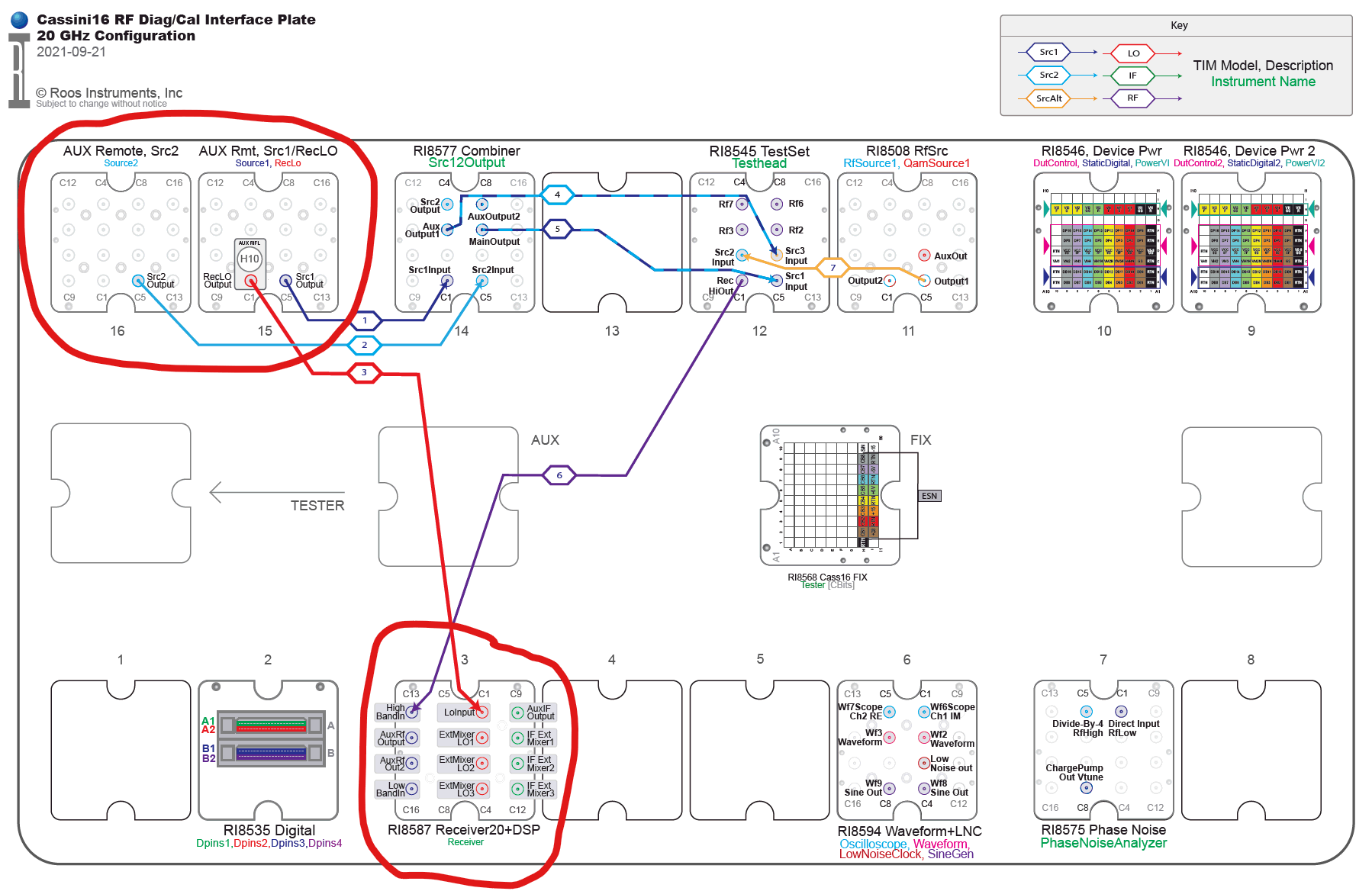
Figure 2: "After" Typical 50 GHz Cassini Configuration Diag/Cal Interface Plate & RF System Diagram
 50GHz_DiagCal_Interface_Plate.pdf
 50GHz_RF_System_Block_Diagram.pdf